It knows itself.
Equipment, settings, connections and documents form a building passport. Unknown information stays visible.

SEETCH combines an app with equipment configured and connected to your building’s systems. The app stores plans, settings and service history. Connected sensors help you see consumption and notice deviations.
Email hi@seetch.ch. Opens your email app.
You can start with the whole building or one task. Monitoring and automatic responses need connected data and testing on site.
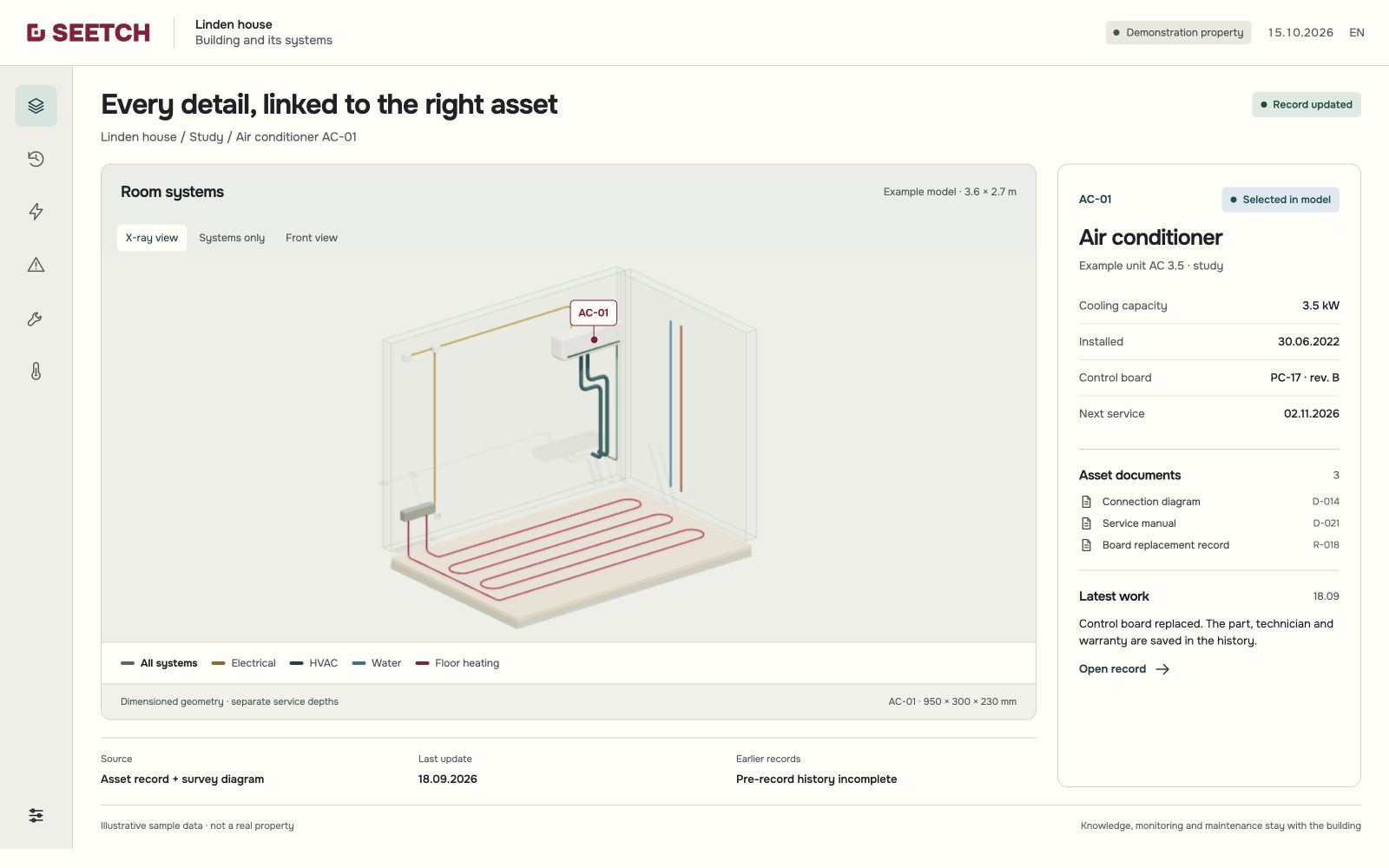
A replaced circuit board, excess heating consumption, a failed pump and planned maintenance. See what information each situation needs and how to use it.
All records, dates and readings in these stories are fictional. The first step is a building passport and history; monitoring and response follow as equipment is connected and checked.
Choose a case to explore.
First stage · building passport and history
On 18 September 2026, the PC-17 rev. A control board in air conditioner AC-01 was replaced with rev. B. The equipment record, repair document and warranties stay linked.
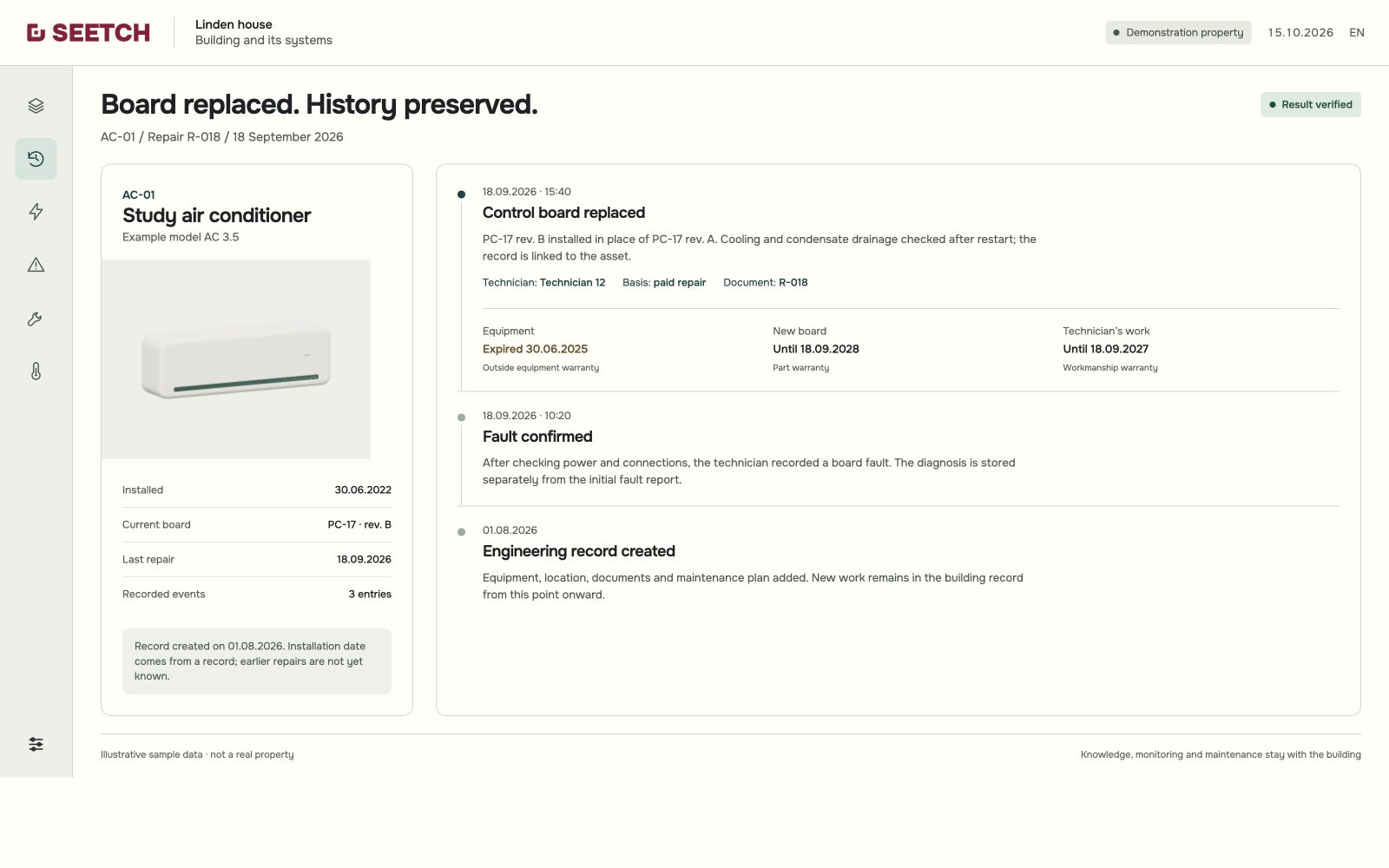
AC-01 was installed on 30 June 2022. Its record was created on 1 August 2026; earlier repairs are not yet known.
When you change contractors, the repair history, supporting documents and each applicable warranty stay with you.
Further development · connected meters and sensors
It is −20 °C outside. The office and living-room windows and the backyard door were left open from 08:00 to 12:00. Heating used 35 kWh over the day. In comparable cold, with the same operating mode and the windows and door closed, 20 kWh was expected.
SEETCH told the owner about the excess use, showed when each window and the door were open, and explained how those events may have affected heating.
Sent the owner the daily use and the opening and closing times for each window and the backyard door. Explained the possible link to a higher heating load.
Saved the deviation and events. Will compare subsequent days in similar cold and the same mode, with the windows and door closed.
If excess use recurs in those conditions, it will cross-check other readings for signs of a possible equipment fault.
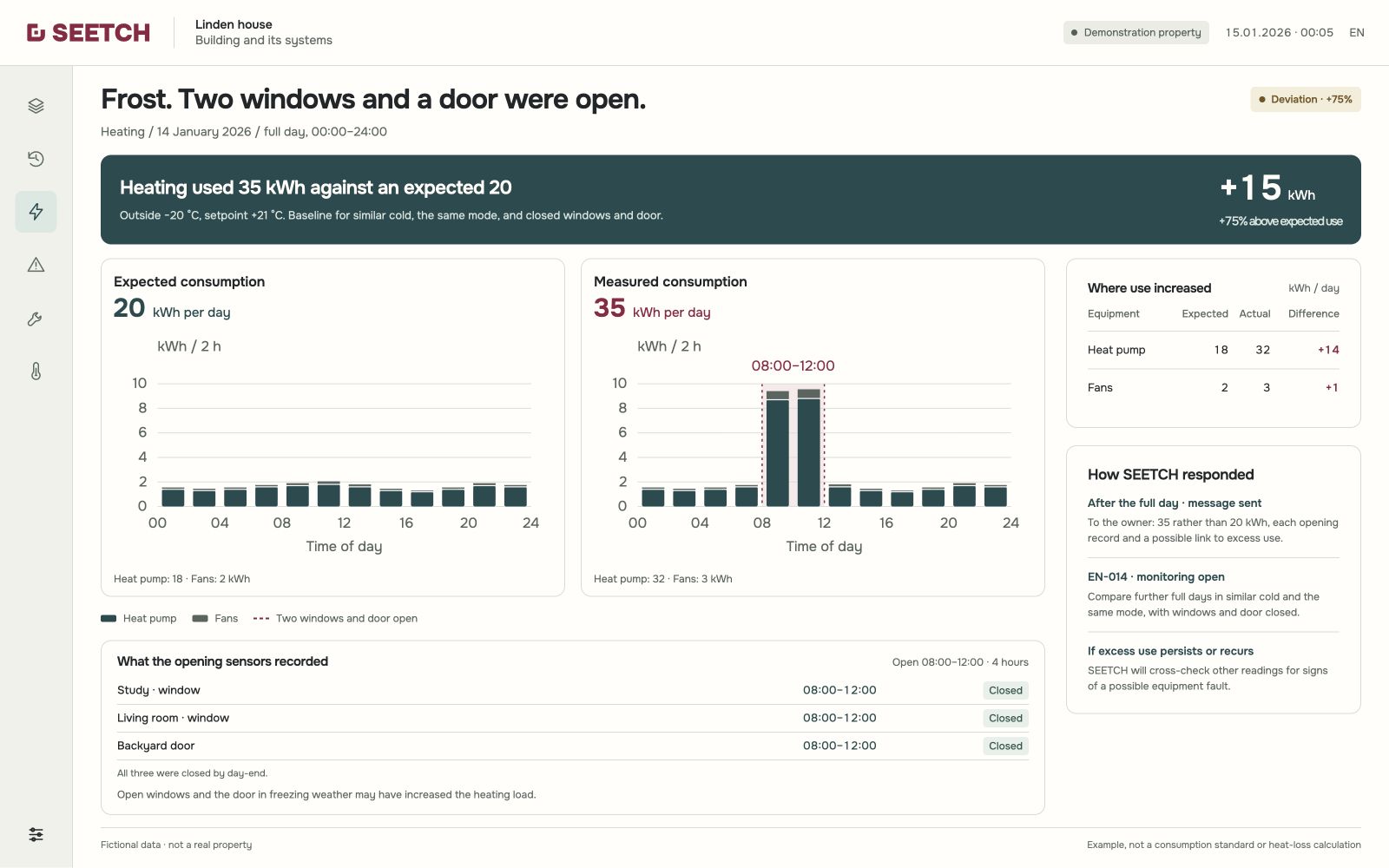
Energy use in two-hour intervals on the same scale. Before 08:00 and after 12:00, values match the baseline; use is higher while the windows and door are open. Daily totals: 20 and 35 kWh. Fictional data.
The owner sees the excess use, each sensor record and a possible cause. EN-014 keeps monitoring: if use again exceeds expectations with the windows and door closed, SEETCH will cross-check other readings for signs of a possible fault.
Next stages · example of protection when a pump fails to start
A drainage pump removes groundwater to protect the basement from flooding. When water rose above the set level, the existing controller issued a start command. The main pump’s start was not confirmed.
Under a previously configured and tested scenario, SEETCH compared the readings: the pump meter shows 0 W while the water level keeps rising. The system took three actions.
The second pump began removing water.
Sent a message: main pump start unconfirmed; backup pump activated.
Sent an inspection request with the sensor readings.
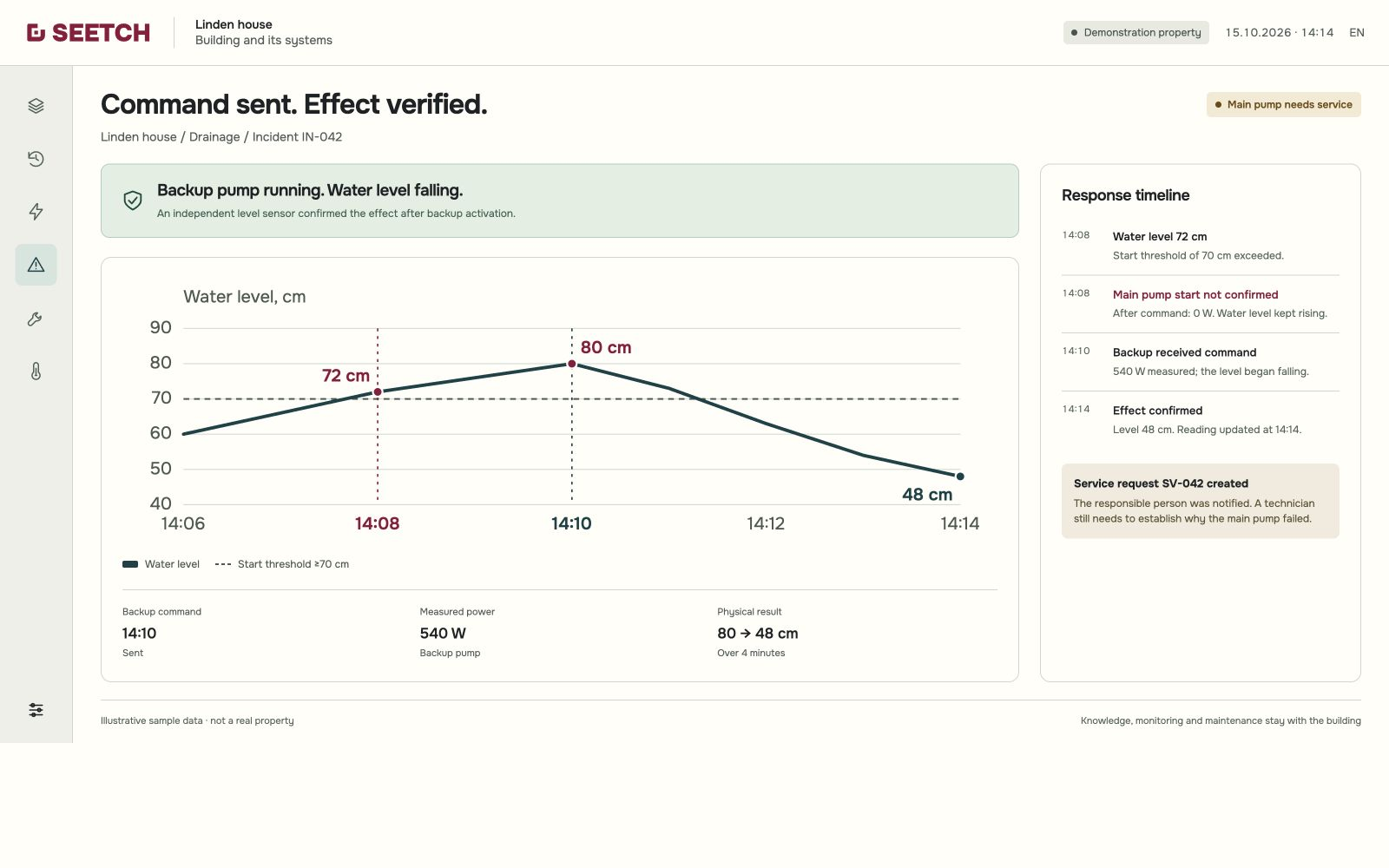
In this example, the water level fell from 80 to 48 cm in four minutes. Why the main pump did not start still needs to be established.
The backup is removing water. Notifications have been sent to the owner and contractor; the main pump needs an inspection. The event sequence is saved in the building history.
First stage · service and handover
Checks and cleaning of AC-01 are planned for 2 November 2026. The work order connects the procedure, repair history, parts and cost estimate; scope and cost await approval.
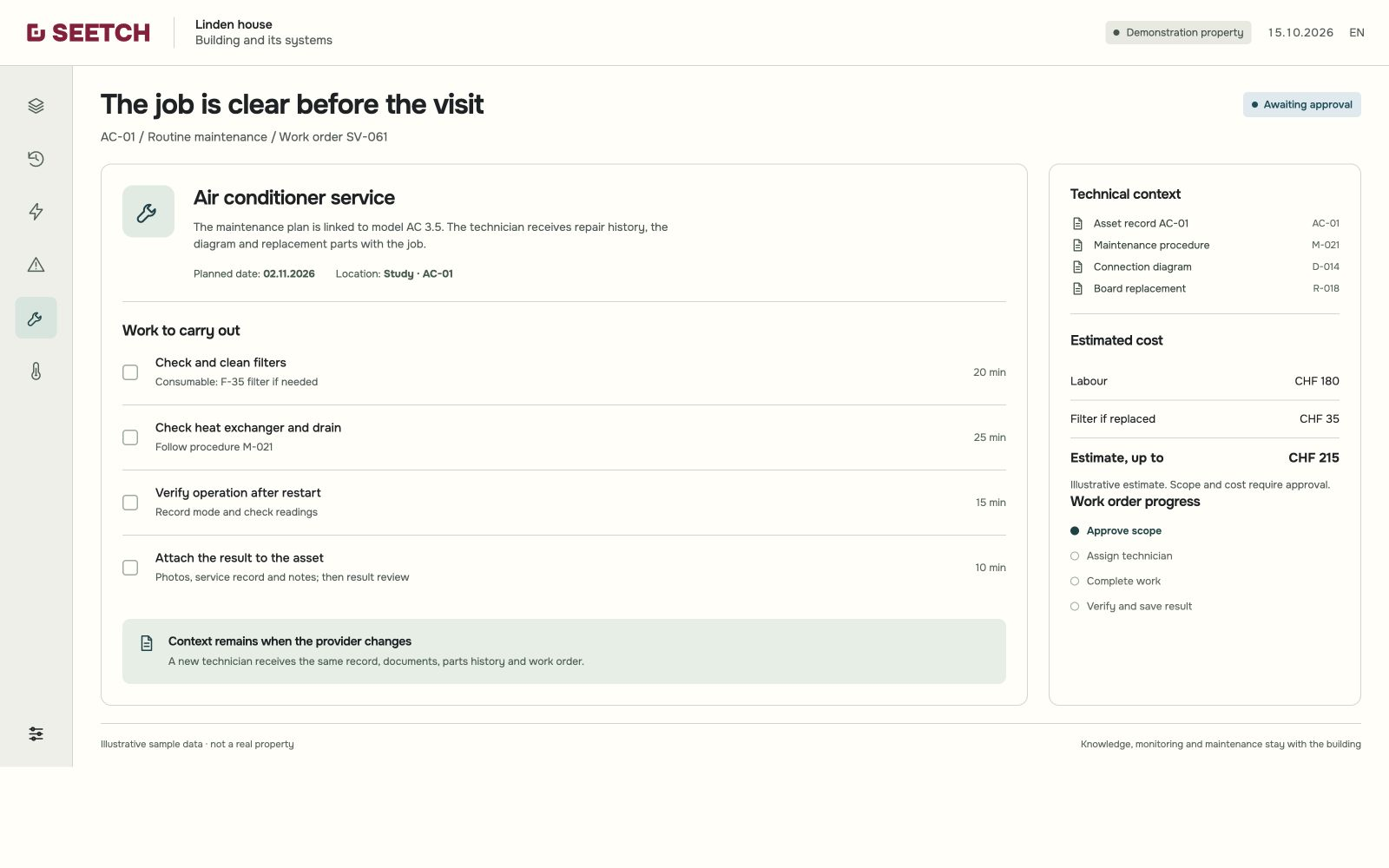
Approval is followed by assignment, work and a result check. The equipment record is updated once the work is documented.
You understand what needs doing, why and at what cost, while the contractor receives the work order and technical context. Scope and costs still await approval; the completed work will remain in the building history.
Each example draws on the same system: building records, readings and work history. These are the tasks it helps with.
Equipment, settings, connections and documents form a building passport. Unknown information stays visible.
Connected data sources make condition and consumption visible in real time.
Higher consumption under the same operating conditions is a reason to check equipment. SEETCH helps you notice the deviation using connected readings.
SEETCH alerts the responsible people when it detects signs of a fault or an emergency. Following a scenario configured and tested in advance, it sends a command to the building’s controls — for example, to shut off water during a leak. When needed, SEETCH immediately sends a service request to the assigned contractor.
Technicians and service companies can be linked to equipment and areas of responsibility. Each work order includes instructions, a date and repair history; results and documents are saved after the job.
Further development includes one purchasing plan based on maintenance schedules: what is needed and when. Exact names and part numbers help compare prices online and buy directly from suppliers.
Equipment can have a primary and a backup contractor. Further development includes requests for quotes from existing and new contractors for the same clear scope of work.
The owner sees what needs doing, why, by when and at what cost. They can make the required decision without working through every technical document; the details remain available.
Knowledge stays with the building
The equipment record, plans, settings and repair history accompany the handover. The owner keeps the documents; new work adds to the same history.
When changing contractors, give the new technician the plans, settings and repair history. SEETCH keeps them in the building passport with the documents.
Assigned specialists carry out the actual work. The knowledge stays with the property.
An open door, longer compressor running time, stopped cooling and unnecessary extraction each call for different actions.
Temperature, running time and electricity use help reveal a change. The responsible person checks the cause, takes action and records the outcome.
Fictional situations and figures, not operating limits. These workflows require suitable, connected data sources and a setup checked on site.
The CR-01 cold-room door was left open. After five minutes, the system sent a warning. The door closed at 10:35 as air temperature reached 7.4 °C. At 10:40 the sensor still read 7.4 °C; the first lower reading appeared at 10:45.
The door opened at 10:10 with air at 3.3 °C. Five minutes later it was still open and the temperature had reached 4.2 °C. The system messaged the responsible person: this example uses a warning after five minutes with the door open.
The door sensor recorded closure. At 10:35, the first recorded maximum temperature in this example was 7.4 °C.
Five minutes after closure, at 10:40, the sensor still read 7.4 °C. At 10:45 it recorded the first lower reading: 7.0 °C.
At 12:00 the sensor read 3.8 °C, back within the +2…+5 °C range used in this example. The latest reading at 14:00 was also 3.8 °C.
The log shows when the warning was sent, when the door closed and the readings that followed. The full sequence can be checked without relying on memory.
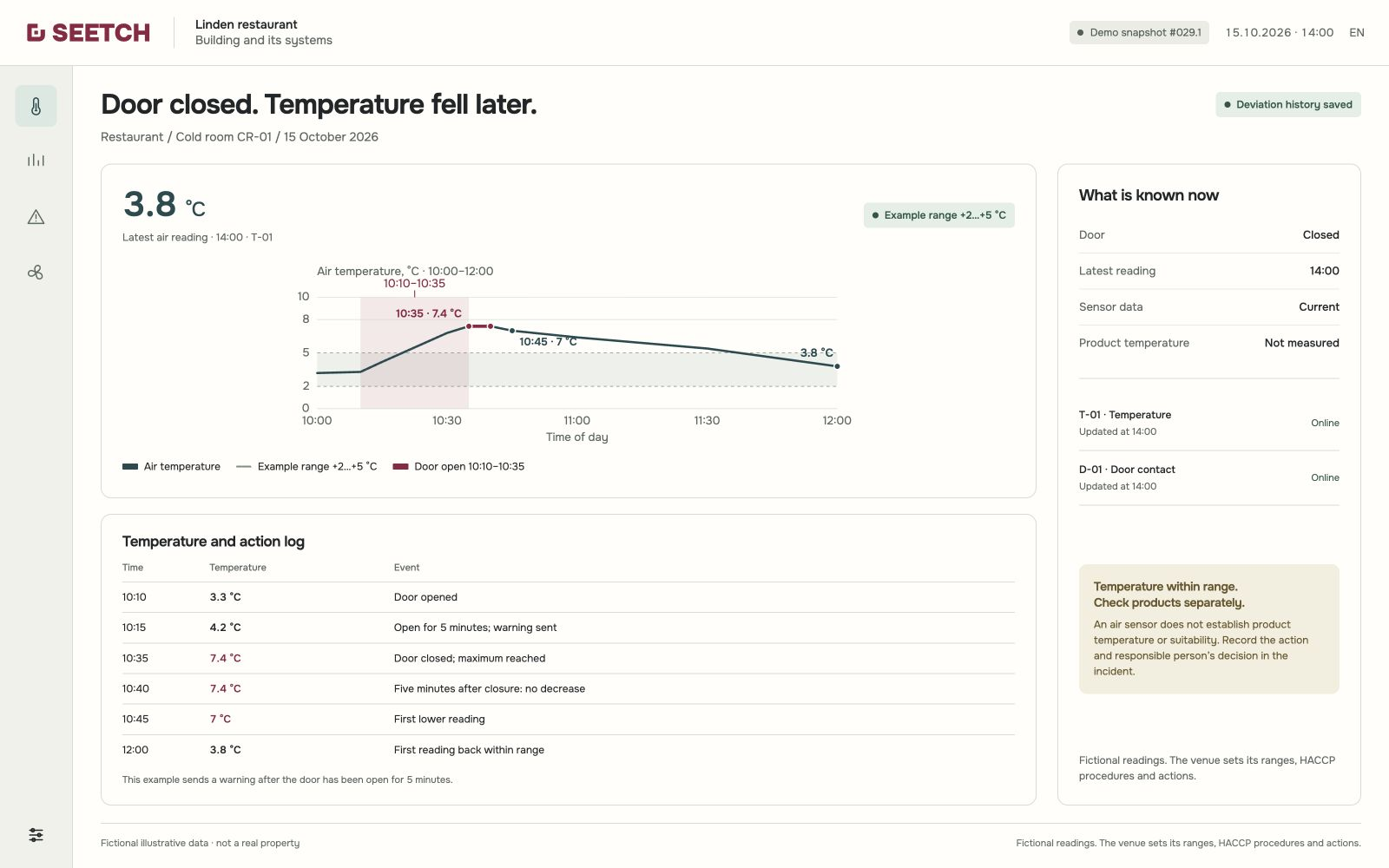
Air temperature does not establish whether food is suitable for use. The restaurant sets its limits and actions.
During a selected hour at a kitchen temperature of 22 °C, the compressor ran for 25 minutes and used 0.4 kWh; at 30 °C, it ran for 45 minutes and used 0.7 kWh. Cold-room air is 4.6 °C, compared with 3.8 °C in the reference period. This calls for a check of the load and refrigeration equipment.
The system records the longer compressor running time as an observation and sends the responsible person a message.
Check conditions around the cold room and condenser, which releases heat. If the condenser is in the kitchen, heat may impair heat rejection. Check ventilation and air conditioning too; the cause is not yet established.
The refrigeration equipment needs inspection. Follow the venue’s procedure immediately for alarms or temperatures outside its limits.
The change gives a reason to check refrigeration equipment before cooling stops. The observation and follow-up actions stay in the log.
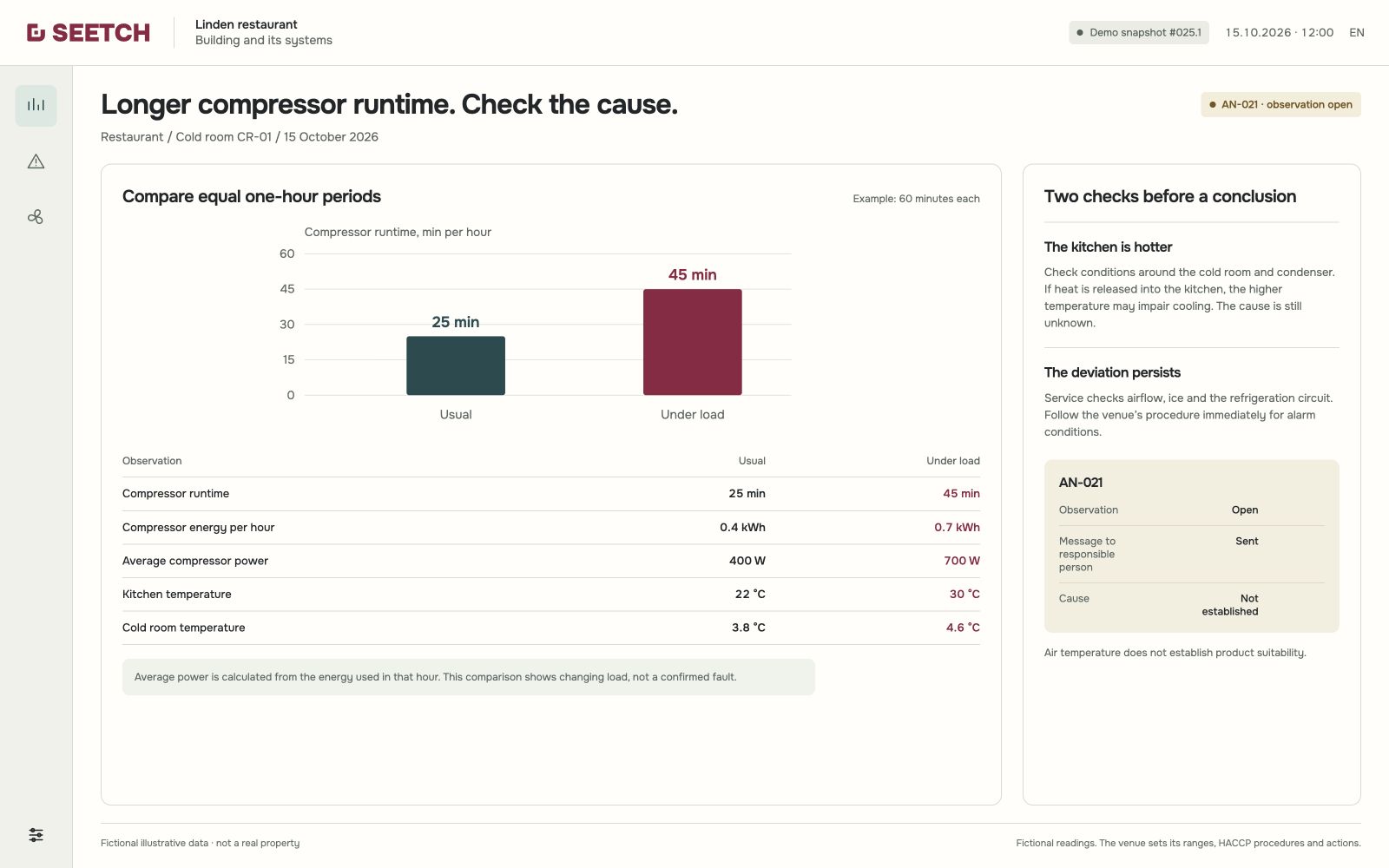
Poor airflow, icing and refrigeration-circuit faults can produce similar signs. A service technician establishes the cause; runtime alone cannot predict failure of a particular part.
The controller requests cooling. Defrost and normal operating delays have ended, but the dedicated compressor meter reads 0 W. Air temperature rises from 3.8 °C at 10:00 to 7.2 °C at 10:20. SEETCH starts the agreed response.
Cooling demand, the end of normal delays and reading validity have been checked. SEETCH alerts the responsible person: compressor start is unconfirmed and temperature is rising.
A task is created to check the cold room and move food to suitable backup storage under the restaurant's procedure.
The system sends a request with readings and the event time to the assigned service company.
The alert, food-handling task and service request are linked to one event. Further decisions and task completion are recorded in the log.
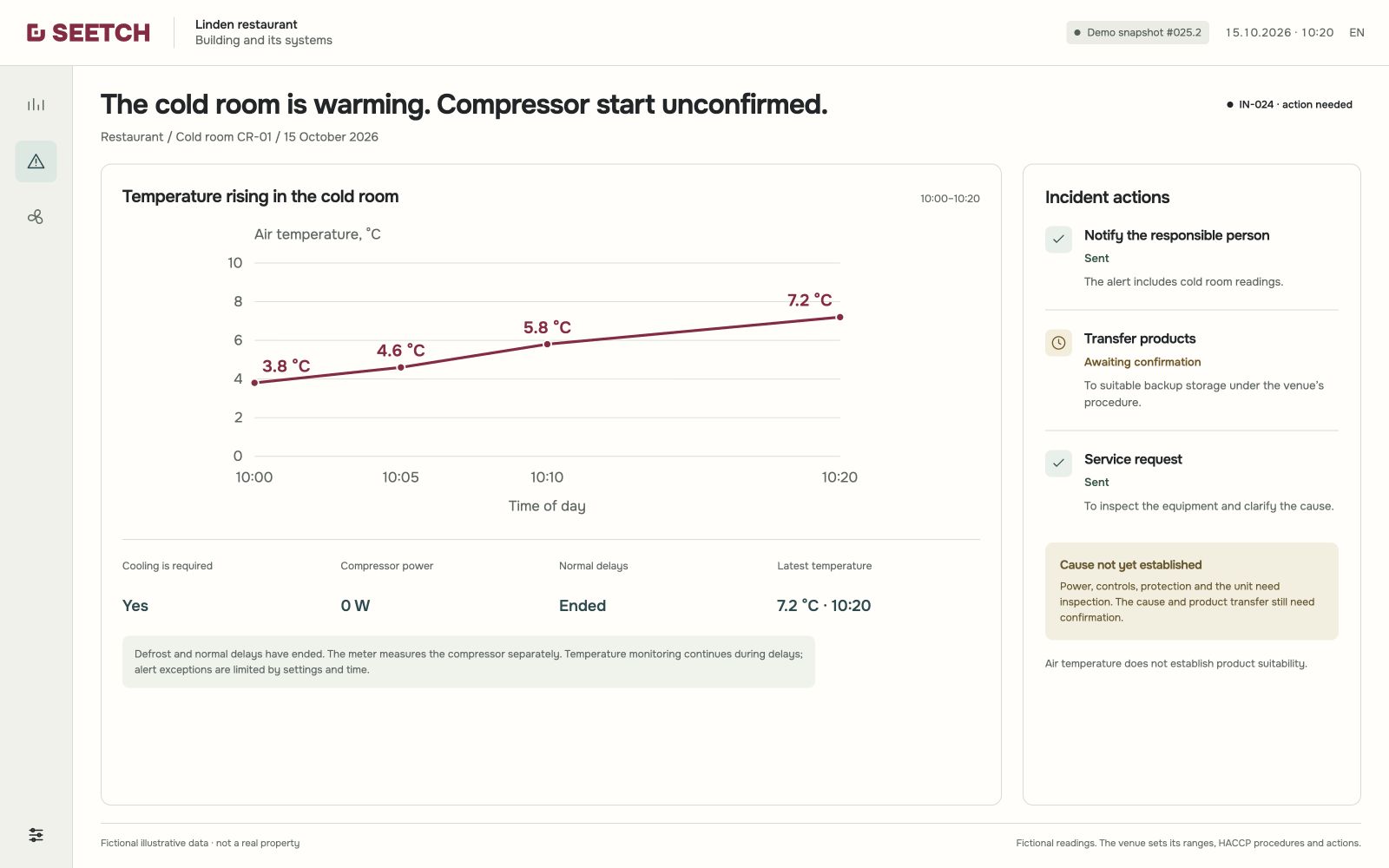
0 W does not identify the cause: power, controls, protection and the unit need inspection. Temperature monitoring continues during defrost and delays. Products are assessed separately under the venue’s procedure.
Hot cooking has given way to cold preparation. The cooking appliances are off, but extraction is still in high mode. In this checked scenario, SEETCH adjusts ventilation to the kitchen’s current workload.
The system uses cooking-appliance status and signals under the hood. In this example, the required run-on has ended; the remaining heat, smoke and steam do not require high mode.
Through connected controls, SEETCH reduces extractor speed and adjusts make-up air with it. Kitchen and outdoor temperatures inform air supply, heating or cooling.
Both hours involved cold preparation under comparable conditions. From 11:00 to 12:00, extraction used 1.2 kWh in high mode; from 12:00 to 13:00, it used 0.6 kWh in demand-based mode.
For an hour with comparable workload, the extraction meter recorded 0.6 rather than 1.2 kWh. Supply-air, heating and cooling energy are accounted for separately.
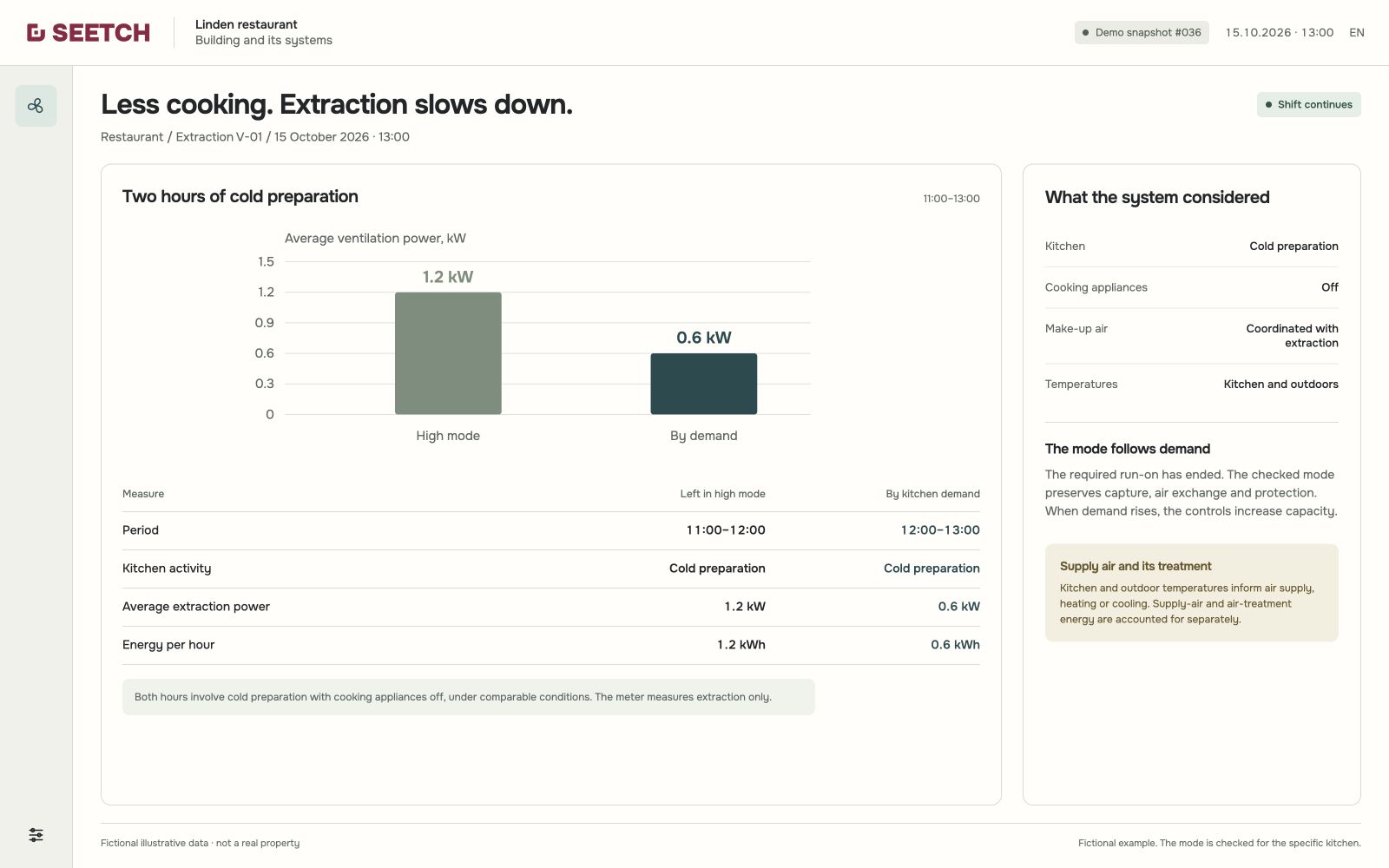
The mode is checked for each kitchen to preserve required air exchange, capture of smoke and steam, and protective functions. When demand rises, the controls increase capacity through the checked sequence. Figures are fictional.
SEETCH receives sensor readings in real time, keeps temperature logs and alerts responsible staff to deviations. This helps them act in time to prevent equipment failures and food losses.
Automatic collection of readings and records helps save staff time on daily checks under the business's procedures, internal audit preparation and log keeping. Limits and checks follow the establishment's HACCP plan. Necessary inspections, decisions and responsibility for food safety remain with the business.
Choose the scope: the whole building or one specific need. You can start with one area and expand as needed.
We discuss what should change and how you will assess the result.
We review available information, documents and history for the whole building or your chosen area.
Where needed, we select compatible sensors and equipment and connect data. We configure functions and test them on site.
We record readings and work history, link them to maintenance and expand the system according to your priorities.
Pricing, estimates and invoices, and the actual benefits are evaluated in the pilot.
Email hi@seetch.ch. Opens your email app.
We create a building passport for each property: a foundation for the available equipment information, settings, documents and history. As work is done, we add what was checked, changed or replaced. Missing and outdated information is clearly marked.
Yes, we work with buildings of any age. Sensors are added to existing systems, so the entire building infrastructure does not need to be replaced. We check equipment compatibility and connection points on site.
SEETCH helps detect changes before equipment fails, such as rising energy use alongside weaker cooling. Suitable sensors on important components extend coverage. Identifying the cause and assessing failure risk requires data and checks. Sudden failures do not always have detectable warning signs.
When signs of a fault appear or a failure occurs, SEETCH notifies the people responsible. Connected controls receive a command through a previously tested routine, such as shutting off the water. When needed, SEETCH immediately sends a service request to the assigned service company. Automatic actions require suitable equipment and testing on site.
A building passport can be created without sensors. For monitoring, you can start with a few sensors for a specific task, then gradually add other important equipment. Coverage grows according to your priorities.
Switzerland, EU countries and North America. Our team is also present in Toronto, Canada.